
Sludgineers Energy and Battery: Beating the Low Energy Wall
In Sludgineers the Energy Level meter is your real clock. It drains whenever the vacuum is firing, and when it hits zero a Low Energy warning stops you cleaning for the rest of the job. Battery and energy capacity upgrades are therefore the highest-value early purchases in Sludgineers.
Key facts
- Meter location
- Top centre of the job HUD
- Displayed as
- Percentage
- Drains when
- The vacuum beam is firing
- At zero
- “Low Energy” warning, cleaning stops
- Fixed by
- Battery / energy capacity upgrades
- Drone batteries
- Upgraded separately
What the Energy Level meter does
Sits at the top centre of every Sludgineers job, shown as a percentage with a lightning icon. It starts full and drops continuously while your vacuum beam is active. It does not regenerate mid-job in any meaningful way — when it is gone, your earning window for that job is over.
This is what makes Sludgineers an active incremental rather than a pure idler. Each job is a budget: you have a fixed quantity of energy and you are deciding, second by second, where to spend it for the best return.

Why energy beats suction early on
New Sludgineers players almost universally pour their first earnings into suction power, because “stronger vacuum” sounds like the obvious upgrade. It is usually the wrong call, and the reason is simple arithmetic.
If your jobs are ending because energy ran out at 50% Job Progress, more suction lets you clear that same 50% slightly faster — but you still stop at zero energy, so you finish at maybe 55%. More energy capacity lets you keep going to 70% or 80%, crossing another one or two of the four cash milestones. The milestone jumps are large and discrete; suction gains are small and continuous.
| Symptom | What it means | What to buy |
|---|---|---|
| Jobs end at Low Energy well before 100% | Energy-capped | Battery / energy capacity |
| Energy left over when the job is fully cleared | Power-capped | Suction power and range |
| Both run out around the same time | Well balanced | Cash and resource multipliers |
| Plenty of both, but earnings feel low | Under-multiplied | Multipliers and Object Bonus upgrades |
Playing around a limited battery
Upgrades are the long-term fix. These habits stretch what you already have:
- Never hold the beam while repositioning. Energy drains whenever the vacuum is firing, regardless of whether it is hitting sludge. Release, move, re-aim, fire.
- Clear contiguous patches. Sweeping back and forth across the map wastes travel time under an active beam. Work outward from an edge.
- Prioritise objects over open ground. Object Bonuses are discrete lump sums; open sludge pays per unit area. When energy is scarce, uncovering a car beats thinning a field.
- Push for the nearest milestone. If the next Job Progress marker is close and energy is nearly gone, spend the last of it getting there. Milestones bank; partial progress toward one does not pay the same.
- END JOB deliberately. When energy is spent, leaving immediately gets you back to the upgrade screen faster. There is no bonus for standing around.
Drone batteries are a separate upgrade line
Once you unlock vacuum drones, they bring their own energy economy. The upgrade tree contains a dedicated Vacuum Drone Battery node — three ranks, described in-game as increasing the battery size of vacuum drones, scaling from 100% to 150%, costing $2,150 plus refined resources at the rank shown in our screenshot.
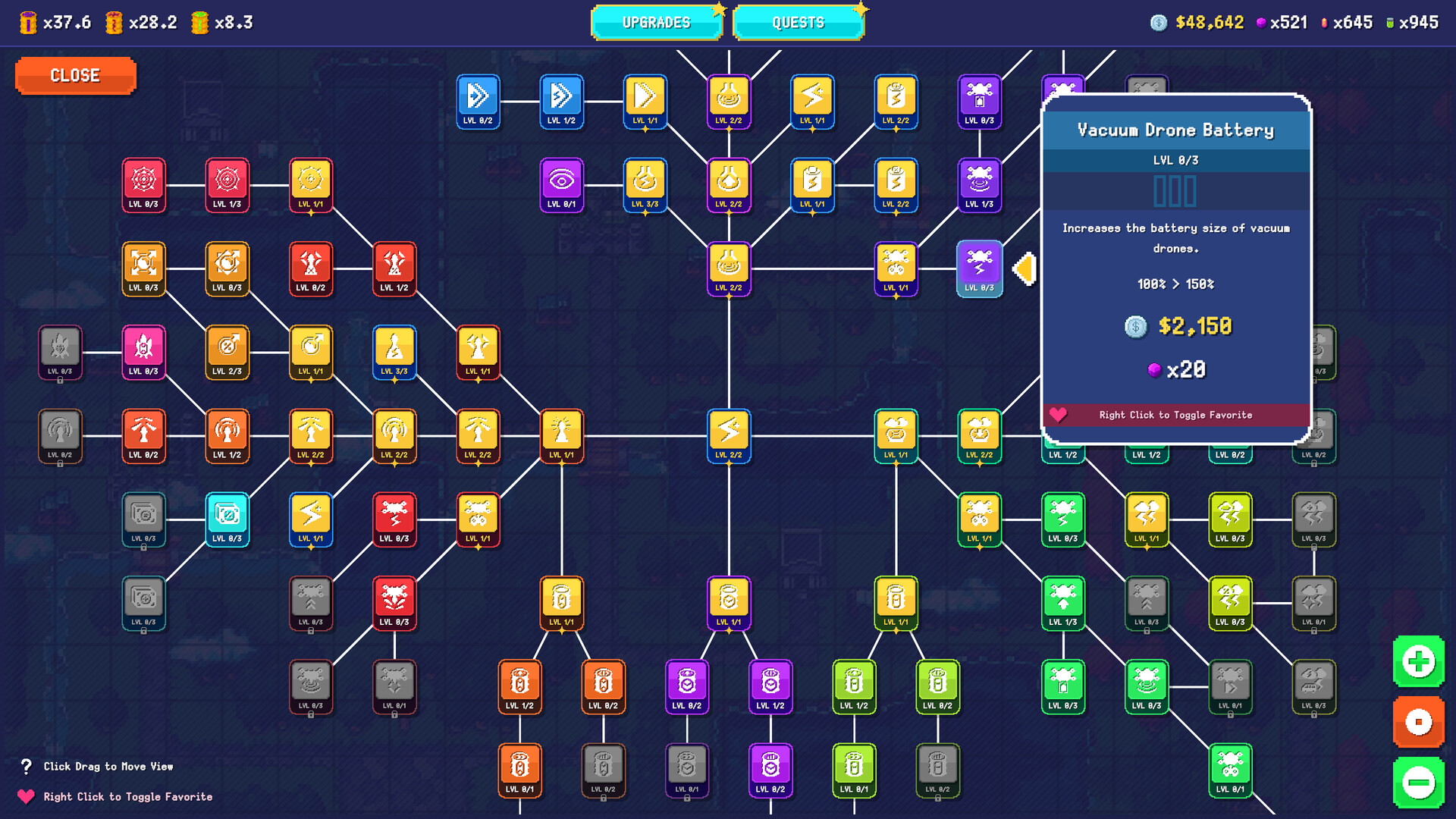
Do not confuse the two lines. Upgrading your own battery does nothing for drone uptime, and vice versa. Once drones are doing a meaningful share of your cleaning, their battery capacity becomes the binding constraint instead of yours.
When energy stops mattering
Eventually it does. Deep into a Sludgineers run, with capacity ranks bought out and drones handling large areas, energy stops being the thing that ends jobs and raw throughput takes over. That is the point to switch spending toward suction power, range, and the multipliers that scale your Completion Cash. The diagnostic table above tells you when you have arrived.
Sludgineers FAQ
What does Low Energy mean in Sludgineers?
It means the Energy Level meter has emptied. Your vacuum stops working for the remainder of that Sludgineers job, so you bank whatever you have earned and return to the map. Energy capacity upgrades raise the ceiling.
How do you get more energy in Sludgineers?
Buy battery and energy capacity nodes in the upgrade tree. They are among the best early purchases in Sludgineers because energy, not suction power, is what ends most early jobs.
Does energy regenerate during a Sludgineers job?
Not meaningfully. The Energy Level meter drains while the vacuum is firing and does not recover enough to matter mid-job. Each job is effectively a fixed energy budget.
Should I upgrade energy or suction first in Sludgineers?
Energy first, in almost all cases. If your jobs end at Low Energy well before the Job Progress bar fills, extra suction only nudges you a few percent further, while extra energy can carry you across another cash milestone.
Related Sludgineers pages
Fact-checked against the official Steam store page, the developer FAQ thread and in-game screenshots. Last verified .