
All Sludgineers Upgrades: The Complete Tech Tree
The Sludgineers upgrade tree is a large drag-to-pan node graph with colour-coded branches. Most nodes carry one to three ranks, every node costs cash and refined resources together, and right-click pins a node as a favourite. This page documents the tree's structure and every node confirmed so far.
Key facts
- Screen
- UPGRADES tab, between jobs
- Node ranks
- Typically LVL 0/1 to 0/3
- Cost type
- Cash and refined resources
- Navigation
- Click-drag to pan; zoom buttons
- Favourites
- Right-click a node to toggle
- Branch coding
- By colour and category
- Prerequisites
- Nodes unlock outward along connecting lines
How the tree is structured
Sludgineers presents its upgrades as a connected graph rather than a list. Nodes sit in clusters joined by lines, and you unlock outward from what you already own — you cannot jump to a distant node just because you can afford it. Colour coding groups related effects, so a cluster of similarly coloured nodes generally belongs to one system.
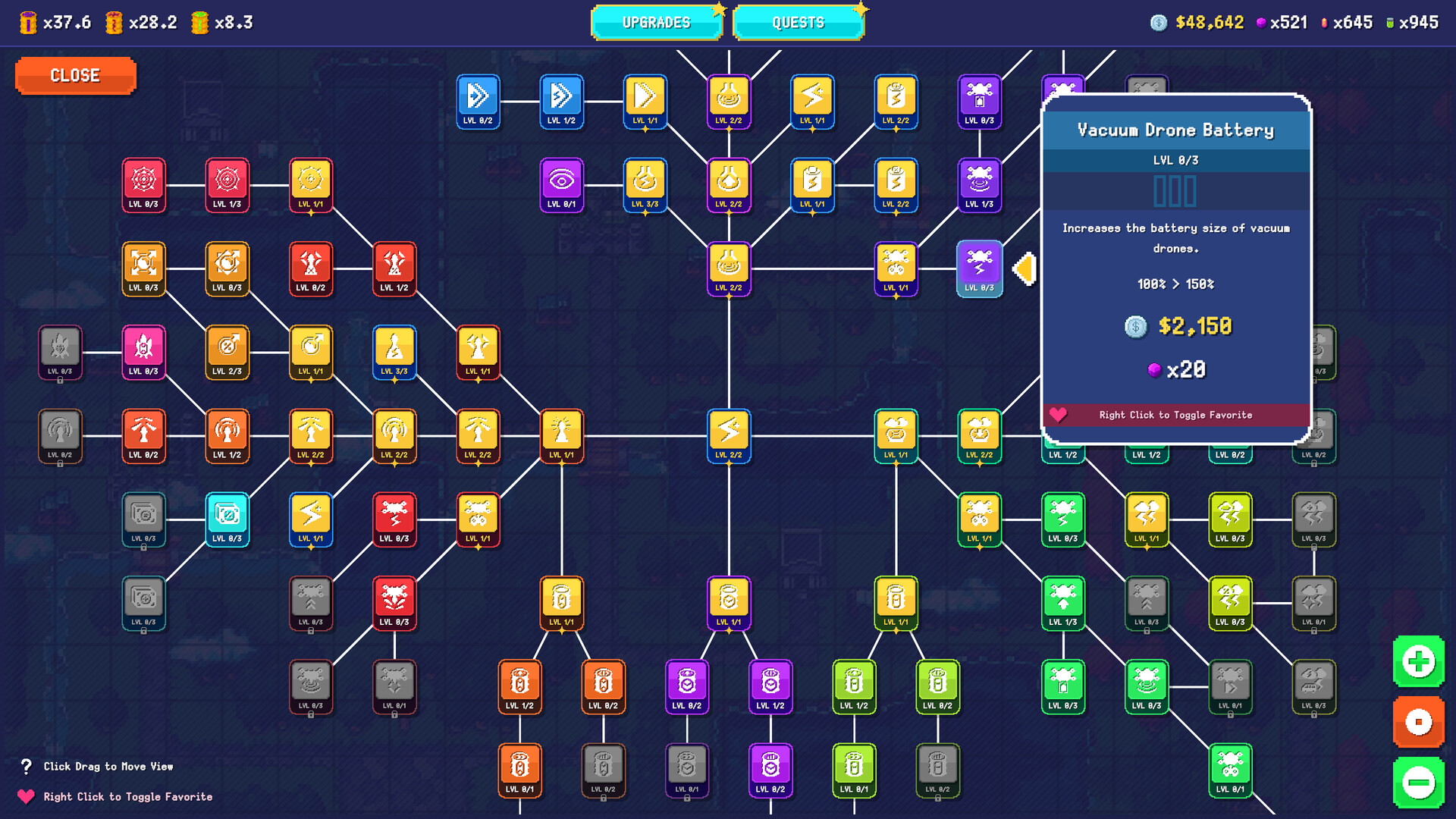
Reading a node tooltip
Select any node in Sludgineers and the tooltip gives you everything you need:
| Tooltip line | What it means | Example (Vacuum Drone Battery) |
|---|---|---|
| Node name | The upgrade's title | Vacuum Drone Battery |
| Rank indicator | Current and maximum rank | LVL 0/3 |
| Description | Plain-language effect | “Increases the battery size of vacuum drones.” |
| Effect scaling | Current value → value after purchase | 100% → 150% |
| Cash cost | Dollars required | $2,150 |
| Resource cost | Refined resources required | ×20 |
| Favourite hint | Right-click to pin | “Right Click to Toggle Favorite” |
The branches
From the tree layout, the confirmed effect categories, and what the developers have described, Sludgineers upgrades fall into these groups:
| Branch | What it improves | Priority |
|---|---|---|
| Energy & battery | Your own energy capacity — how long the vacuum runs before the Low Energy warning ends a job | Buy first. Energy is what ends early jobs. Guide |
| Suction power & range | How fast the beam clears sludge and how far it reaches | Later — a throughput upgrade, only useful once energy is comfortable |
| Cash multipliers | The multiplier applied to Completion Cash on the payout screen | Very high. Compounds across every remaining job |
| Resource yield | How much refined material each job produces | High — resources gate every future node purchase |
| Object bonuses | What uncovered cars, buildings and scenery pay | Good — object bonuses were ~21% of one observed job total |
| Refinery | Processing throughput, then refinery automation | Buy automation as soon as affordable. Largest QoL jump in the game |
| Vacuum drones | Unlocking drones, then their battery, density and behaviour | Mid-late. Multiplies throughput, so fix fundamentals first. Guide |
| Air purifiers | The second hi-tech tool, for pollution types the vacuum does not handle | Late — arrives with new pollution types |
Confirmed nodes
Nodes we have read directly from in-game tooltips, with exact values:
| Node | Description | Ranks | Scaling | Cost |
|---|---|---|---|---|
| Vacuum Drone Battery | Increases the battery size of vacuum drones | 3 (LVL 0/3) | 100% → 150% | $2,150 + 20 refined resources |
Navigating a tree this big
- Click and drag to move the view — the tree is far larger than one screen.
- Zoom buttons sit in the bottom-right corner, with a recentre control between plus and minus.
- Right-click to favourite any node. This is the single most useful habit on a board this size: pin your savings target so you stop drifting into buying whatever is nearest.
- Greyed nodes are locked behind prerequisites you have not bought yet.
- Resource counters sit in the top corners — raw barrel totals top left, cash and refined resource counts top right — so you can check affordability without leaving the tree.
Spending strategy
Full reasoning lives on the Sludgineers best upgrades and upgrade order page, but the short version: energy capacity, then cash and resource multipliers, then refinery throughput and automation, then object bonus value, then raw suction power. Finish good lines rather than taking rank 1 of everything — effects compound within a branch, and rank costs climb as you go.
Sludgineers FAQ
How many upgrades are in Sludgineers?
The Sludgineers upgrade tree holds dozens of nodes across roughly eight effect categories, most with one to three ranks. A complete verified enumeration is still being compiled.
What do Sludgineers upgrades cost?
Sludgineers upgrade nodes cost cash and refined resources together. For example the Vacuum Drone Battery node costs $2,150 plus 20 refined resources at the rank observed.
How do you favourite an upgrade in Sludgineers?
Right-click the node. The tree shows a 'Right Click to Toggle Favorite' hint, which lets you pin the node you are saving toward on a very large board.
What is the Vacuum Drone Battery in Sludgineers?
A three-rank upgrade node that increases the battery size of vacuum drones, scaling from 100% to 150%. At the rank observed it cost $2,150 plus 20 refined resources.
Related Sludgineers pages
Fact-checked against the official Steam store page, the developer FAQ thread and in-game screenshots. Last verified .